x games.Explore the games

X GAMES / CHROME EXTENSION

Your next world.
One click away.

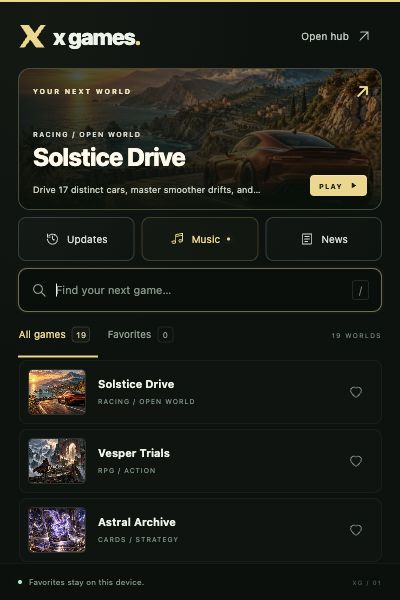
Your collection, right in the toolbar. Search the games, keep your favorites close, and jump into X Games whenever the mood strikes.

Free manual installation · Version 1.0.0 · Desktop Chrome

19 gamesFind your next favorite.
One familiar tabYour music and progress stay with X Games.
Your favoritesKept on this device.
YOUR TOOLBAR. ANOTHER WORLD.01 / X
X Games extension with game search, favorites and quick linksA little shortcut to a lot of playing.

A QUICK SETUP

Add X Games to Chrome.

This download installs from a folder using Chrome’s Developer mode.

  1. 01

    Download and extract

    Download the ZIP above, then extract the X-Games-Chrome-Extension folder. Keep that folder somewhere permanent.

  2. 02

    Open Chrome’s extensions page

    Paste this address into Chrome’s address bar and press Enter.

  3. 03

    Load the extension folder

    Turn on Developer mode, choose Load unpacked, and select the extracted folder that contains manifest.json.

  4. 04

    Pin it. Pick a game.

    Open Chrome’s puzzle-piece Extensions menu, pin X Games, then click its icon. Your games are ready.

SAME WORLDS. SAME PROGRESS.

Keep the good part going.

Games open inside your existing X Games tab when one is available. Music keeps playing there when the extension popup closes. The toolbar collection includes the 19 games in this release; the hub’s News and Updates pages always show their latest published content.

Explore the music

SMALL BY DESIGN

Only X Games access.

The extension stores its favorites on your device and finds tabs on x-games-hub.pages.dev and x-games.h78580.chatgpt.site. It uses those tabs to open your chosen game. Toolbar favorites are separate from website favorites. It has no content scripts, advertising, or analytics.

Chrome’s installation guide